M.2 vs NVMe: Real Differences, Speed & Compatibility Guide
InfoNest Team
January 22, 2026
281 views
M.2 vs. NVMe: What Are the Real Differences?
Illustration showing confusion between M.2, NVMe, PCIe, SATA, Gen3 and Gen4 storage terms with physical SSD slot and data flow comparisonWhy Storage Terms Are So Hard to Understand
If you have ever tried to buy an SSD, chances are you walked away more confused than when you started. People casually use terms like 'M.2', 'NVMe', 'PCIe', 'SATA', 'Gen3', and 'Gen4' as if they are fluent storage engineers. The terms describe different layers of the same system, but they are often compared as if they compete.
The biggest source of misunderstanding is this: M.2 and NVMe are not alternatives. They are not rivals. They solve different problems. Comparing them directly is akin to comparing a parking space to the regulations of the road. One describes physical structure; the other describes how data moves.
This misconception matters more than people realise. Choosing the wrong type of storage can easily lead to:
Paying extra for performance you will never use
Buying an SSD that physically fits but does not work
Missing out on speed improvements your system actually supports
Before we go deeper, it helps to understand why this confusion exists. Many online listings and reviews loosely label drives as “M.2 NVMe” without explaining what each part means. That’s how users end up wondering why two identical-looking drives behave completely differently— or why a system refuses to boot.
Let's meticulously dissect the process, commencing from the fundamentals.
What Is M.2?
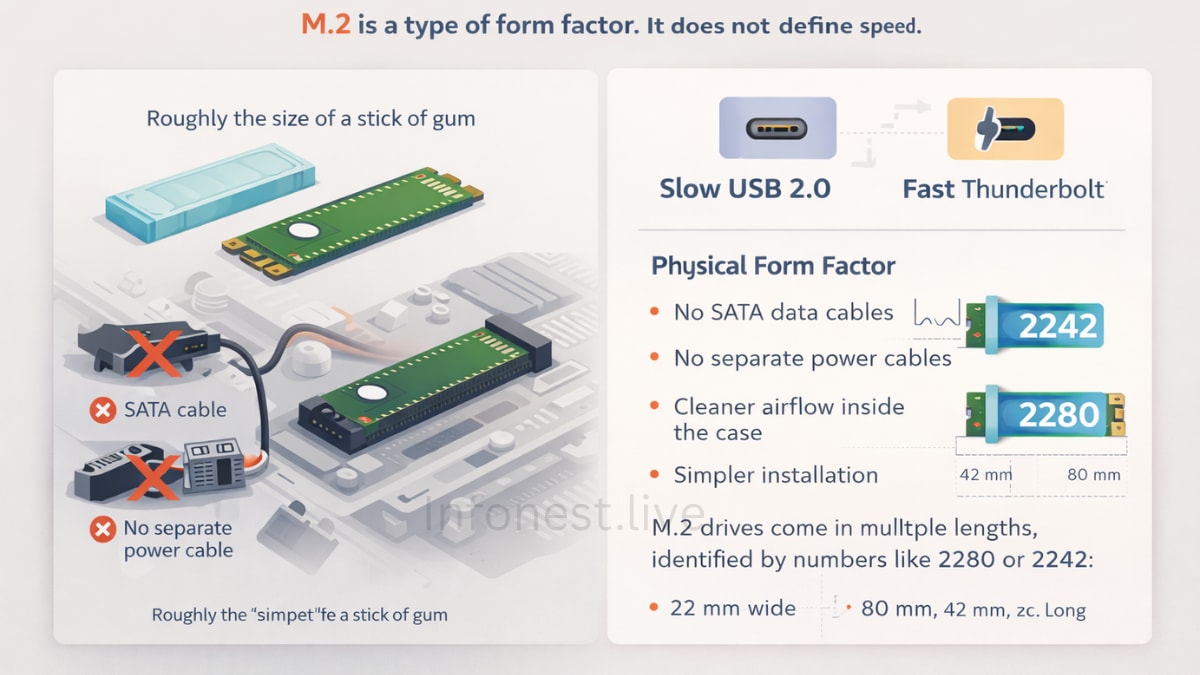
M.2 SSD form factor diagram showing compact gum-stick size drive mounted on motherboard without SATA or power cablesThe most important thing to first understand is this:
M.2 does not define speed.
M.2 is a form factor. It describes the physical shape, size, and connector layout of a device — nothing more. It does not tell you how fast the drive is, how data moves, or which protocol it uses.
A useful analogy is USB. A USB-C connector can carry slow USB 2.0 data or extremely fast Thunderbolt data. The connector looks the same, but the performance depends on what is happening behind it. M.2 works the same way.
The Physical Form Factor
An M.2 SSD is compact, flat, and rectangular, resembling the size of a gum stick. This compact design is why M.2 drives dominate modern laptops and clean desktop builds. They plug directly into the motherboard and are secured with a single screw.
Using M.2 storage provides several practical benefits:
No SATA data cables
No separate power cables
Cleaner airflow inside the case
Simpler installation
M.2 drives come in multiple lengths, identified by numbers like 2280 or 2242:
22 mm wide
80 mm, 42 mm, etc. long
The most common consumer size is M.2 2280, which almost all modern motherboards support.
M.2 Key Types (Where Confusion Begins)
Not all M.2 drives are electrically the same. This is where compatibility issues appear.
M.2 connectors use key notches to prevent incompatible devices from being inserted incorrectly:
B-Key → SATA or PCIe x2
M-Key → PCIe x4 (required for full NVMe performance)
B+M-Key → Broad compatibility, but limited speed
An NVMe SSD capable of high speeds will almost always use an M-key connector. If your motherboard only supports SATA signals on its M.2 slot, an NVMe drive will physically fit but will not function.
This defect is not theory—it is one of the most common causes of “SSD not detected” problems.
M.2 Is Not Just for SSDs
While SSDs are the most common M.2 devices, the slot itself can also host:
Wi-Fi and Bluetooth cards
Cellular modems
Specialized expansion modules
However, in consumer discussions, the term "M.2" typically refers to storage, which is where NVMe comes into play.
What Is NVMe?
NVMe protocol illustration comparing modern NVMe SSD communication with legacy AHCI storage architectureNVMe (Non-Volatile Memory Express) has nothing to do with physical size. It is a communication protocol — a set of rules that defines how storage talks to the CPU.
To understand why NVMe exists, we need to look at what came before it.
NVMe vs. AHCI: Why a New Protocol Was Needed
Before NVMe, AHCI was the protocol that most SSDs used. AHCI was intended for mechanical hard drives. AHCI thought that discs would be slow and spinning and that there wouldn't be much parallelism. It worked, but it wasn't meant for flash memory. Some of the problems with AHCI are:
One command queue
Long latency
CPU consumption that isn't efficient NVMe was made just for flash storage. It gets rid of extra layers and lets current CPUs talk to storage much more quickly.
How NVMe Communicates with Your System
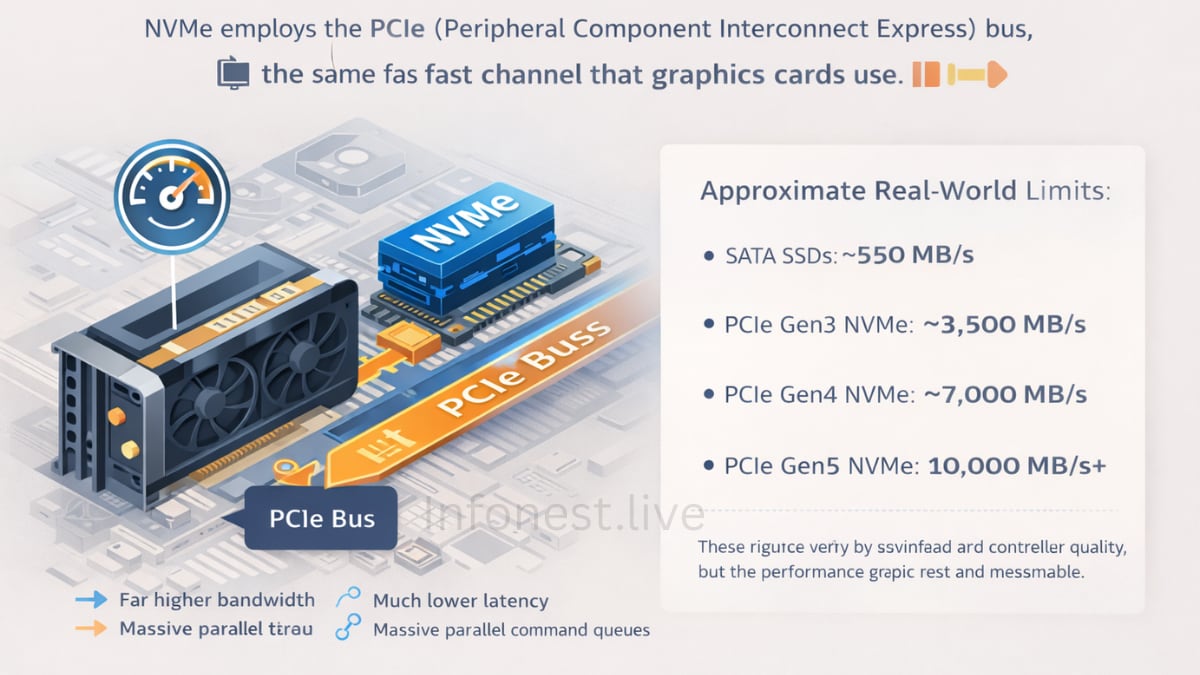
Diagram showing NVMe SSD using PCIe bus to communicate directly with CPU compared to SATA SSD speed limitsNVMe uses the PCIe (Peripheral Component Interconnect Express) bus — the same high-speed pathway used by graphics cards. This is why NVMe performance scales with PCIe generations.
The practical advantages are substantial:
Far higher bandwidth
Much lower latency
Massive parallel command queues
To put numbers on it (approximate real-world limits):
SATA SSDs: ~550 MB/s
PCIe Gen3 NVMe: ~3,500 MB/s
PCIe Gen4 NVMe: ~7,000 MB/s
PCIe Gen5 NVMe: 10,000 MB/s+
These figures vary by workload and controller quality, but the performance gap is real and measurable.
M.2 vs. NVMe: The Core Misunderstanding
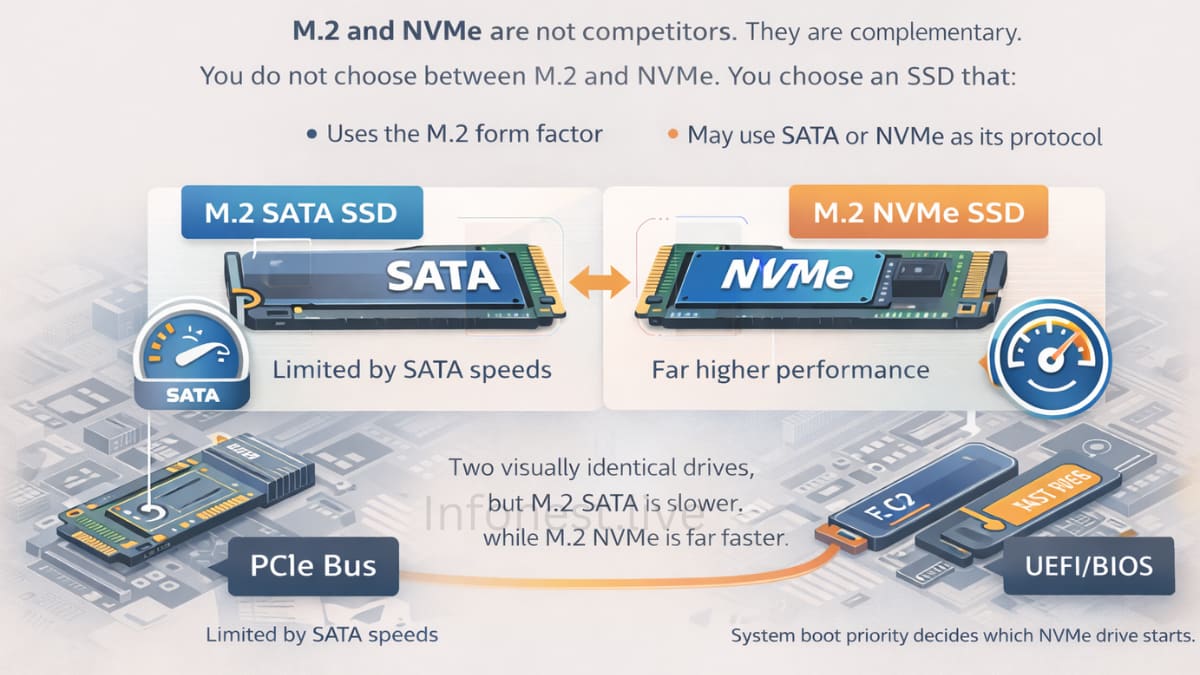
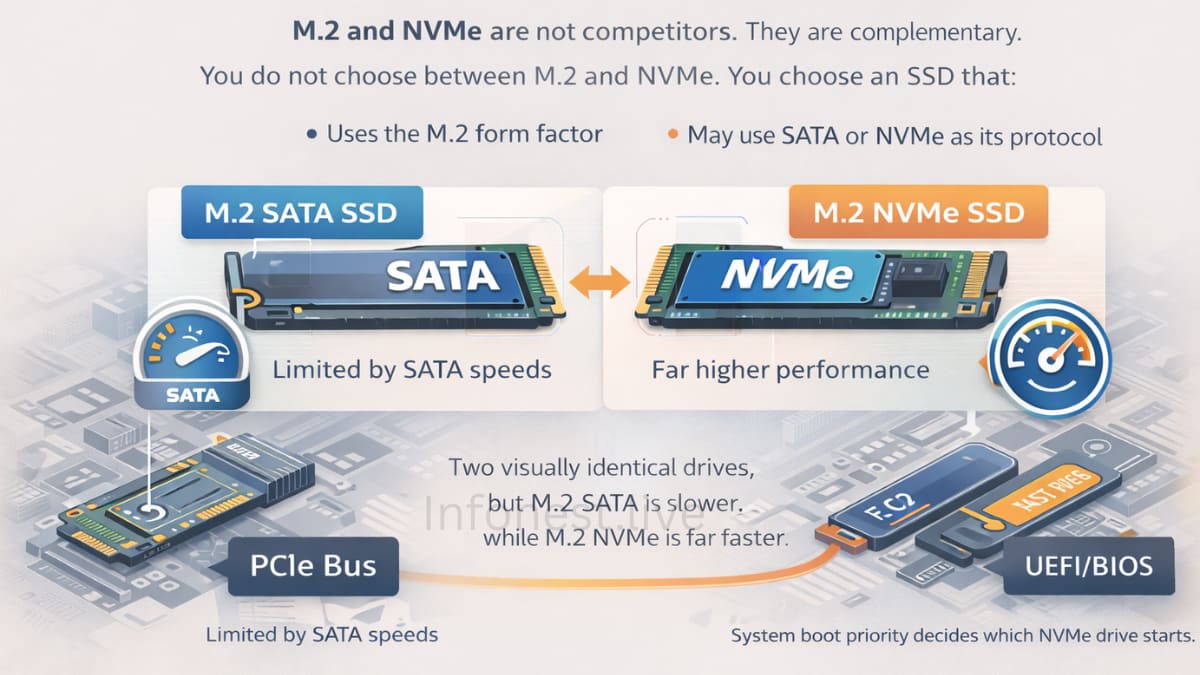
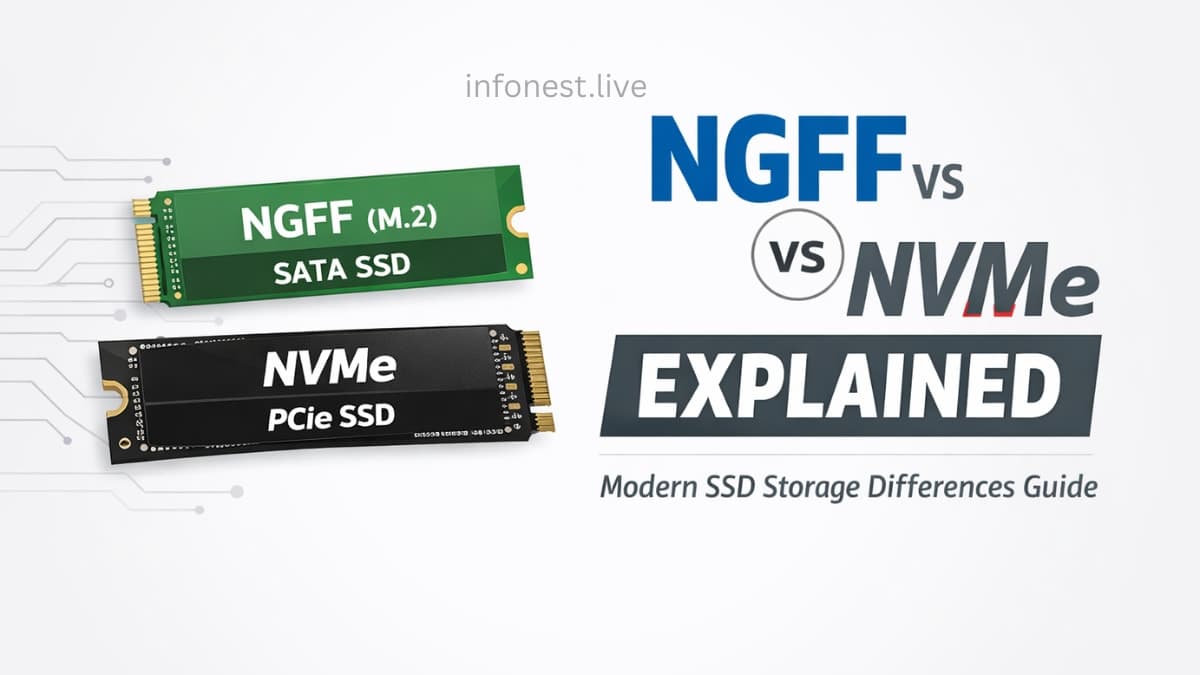
Comparison of M.2 SATA SSD and M.2 NVMe SSD showing identical appearance but different protocols and performanceHere is the clarification that resolves most confusion:
M.2 and NVMe are not competitors. They are complementary.
You do not choose between M.2 and NVMe. You choose an SSD that:
Uses the M.2 form factor
May use SATA or NVMe as its protocol
This leads to two visually identical drives behaving very differently:
M.2 SATA SSD → limited by SATA speeds
M.2 NVMe SSD → uses PCIe and NVMe for far higher performance
This distinction becomes critical when dealing with boot drives.
If you install two NVMe drives with Windows installed on each, the system will not “choose the faster one.”. The motherboard firmware (UEFI/BIOS) determines which drive boots, based on boot priority. This scenario is discussed in more detail in our upcoming guide on dual-NVMe boot behaviour (linked internally once published) and is closely related to NGFF vs. NVMe confusion—which many users still incorrectly treat as interchangeable.
M.2 SATA vs. M.2 NVMe: Real-World Differences
On paper, the speed difference looks dramatic. In practice, how much you feel it depends on what you do.
Performance
M.2 SATA SSDs
Max ~550 MB/s
Similar to 2.5-inch SATA SSDs
M.2 NVMe SSDs
Several gigabytes per second
Much lower latency
Everyday tasks like browsing or emailing will not run “10× faster”. However, system responsiveness, multitasking, and file operations do improve noticeably.
Cost Reality (Important Correction)
A few years ago, NVMe carried a price premium. Today, entry-level NVMe drives cost nearly the same as SATA SSDs. The remaining price difference appears mainly in high-end Gen4 and Gen5 models.
For most buyers, choosing SATA M.2 in 2025 only makes sense if:
The motherboard does not support NVMe
The laptop is older and SATA-only
M.2 SATA vs. M.2 NVMe: Real-World Differences
On paper, the speed difference looks dramatic. In practice, how much you feel it depends on what you do.
Performance
M.2 SATA SSDs
Max ~550 MB/s
Similar to 2.5-inch SATA SSDs
M.2 NVMe SSDs
Several gigabytes per second
Much lower latency
Everyday tasks like browsing or emailing will not run “10× faster”. However, system responsiveness, multitasking, and file operations do improve noticeably.
Cost Reality (Important Correction)
A few years ago, NVMe carried a price premium. Today, entry-level NVMe drives cost nearly the same as SATA SSDs. The remaining price difference appears mainly in high-end Gen4 and Gen5 models.
For most buyers, choosing SATA M.2 in 2025 only makes sense if:
The motherboard does not support NVMe
The laptop is older and SATA-only
M.2 SATA vs. M.2 NVMe: Real-World Differences
On paper, the speed difference looks dramatic. In practice, how much you feel it depends on what you do.
Performance
M.2 SATA SSDs
Max ~550 MB/s
Similar to 2.5-inch SATA SSDs
M.2 NVMe SSDs
Several gigabytes per second
Much lower latency
Everyday tasks like browsing or emailing will not run “10× faster”. However, system responsiveness, multitasking, and file operations do improve noticeably.
Cost Reality (Important Correction)
A few years ago, NVMe carried a price premium. Today, entry-level NVMe drives cost nearly the same as SATA SSDs. The remaining price difference appears mainly in high-end Gen4 and Gen5 models.
For most buyers, choosing SATA M.2 in 2025 only makes sense if:
The motherboard does not support NVMe
The laptop is older and SATA-only
M.2 SATA vs. M.2 NVMe: Real-World Differences
On paper, the speed difference looks dramatic. In practice, how much you feel it depends on what you do.
Performance
M.2 SATA SSDs
Max ~550 MB/s
Similar to 2.5-inch SATA SSDs
M.2 NVMe SSDs
Several gigabytes per second
Much lower latency
Everyday tasks, like browsing or emailing, will not run "10× faster." However, system responsiveness, multitasking, and file operations do improve noticeably.
Cost Reality (Important Correction)
A few years ago, NVMe carried a price premium. Today, entry-level NVMe drives cost nearly the same as SATA SSDs. The remaining price difference appears mainly in high-end Gen4 and Gen5 models.
For most buyers, choosing SATA M.2 in 2025 only makes sense if:
The motherboard does not support NVMe
The laptop is older and SATA-only
Compatibility Is Where People Get Burned
Physical fit does not guarantee compatibility.
Motherboard Support
M.2 slots may support:
SATA only
PCIe (NVMe) only
Both
You must check the motherboard manual. No shortcut replaces this step.
Laptop Limitations
Some models only work with SATA M.2, while others work with NVMe but slow down because of heat. BIOS support varies. This is why update tutorials often don't work when they think they can be used on a desktop.
Power, heat, and reality checks
When under load, NVMe drives need greater power. This can somewhat shorten the battery life of laptops while they are doing a lot of work. For PCs, it mostly means heat. Thermal throttling can happen when transfers go on for a long time, especially on Gen4 and Gen5 drives that don't have heatsinks. For this reason, a lot of motherboards now come with M.2 heatsinks. This idea isn't just marketing talk; it's science.
Who Should Choose What?
Gamers: NVMe improves load times and future-proofs systems for technologies like DirectStorage
Creators: NVMe is non-negotiable for large files and timelines
Office users: SATA is “fast enough”, but NVMe offers better longevity at similar cost
Future-Proofing Matters
Software, games, and operating systems continue to grow. SATA is already a legacy interface in new platforms. Choosing NVMe aligns better with future workloads, including AI-assisted applications — an area we explored earlier when discussing how IoT and AI systems exchange large datasets efficiently in our article on AIoT 👉 https://www.infonest.live/blog/iot-artificial-intelligence-aiot-explained
Common Myths (Cleared Up)
M.2 always means NVMe → False
NVMe is overkill → Increasingly false as prices converge
Only professionals benefit. → Latency improvements affect everyone
Final Thoughts
M.2 defines how a drive fits. NVMe defines how fast and efficiently it communicates. When combined, they deliver the fastest consumer storage available today.
If your system supports it, an M.2 NVMe SSD is almost always the correct choice. SATA still works, but NVMe is where the ecosystem is clearly headed.